
Expense tracker for iPhone & iPad · No bank login
How much money do I actually have?
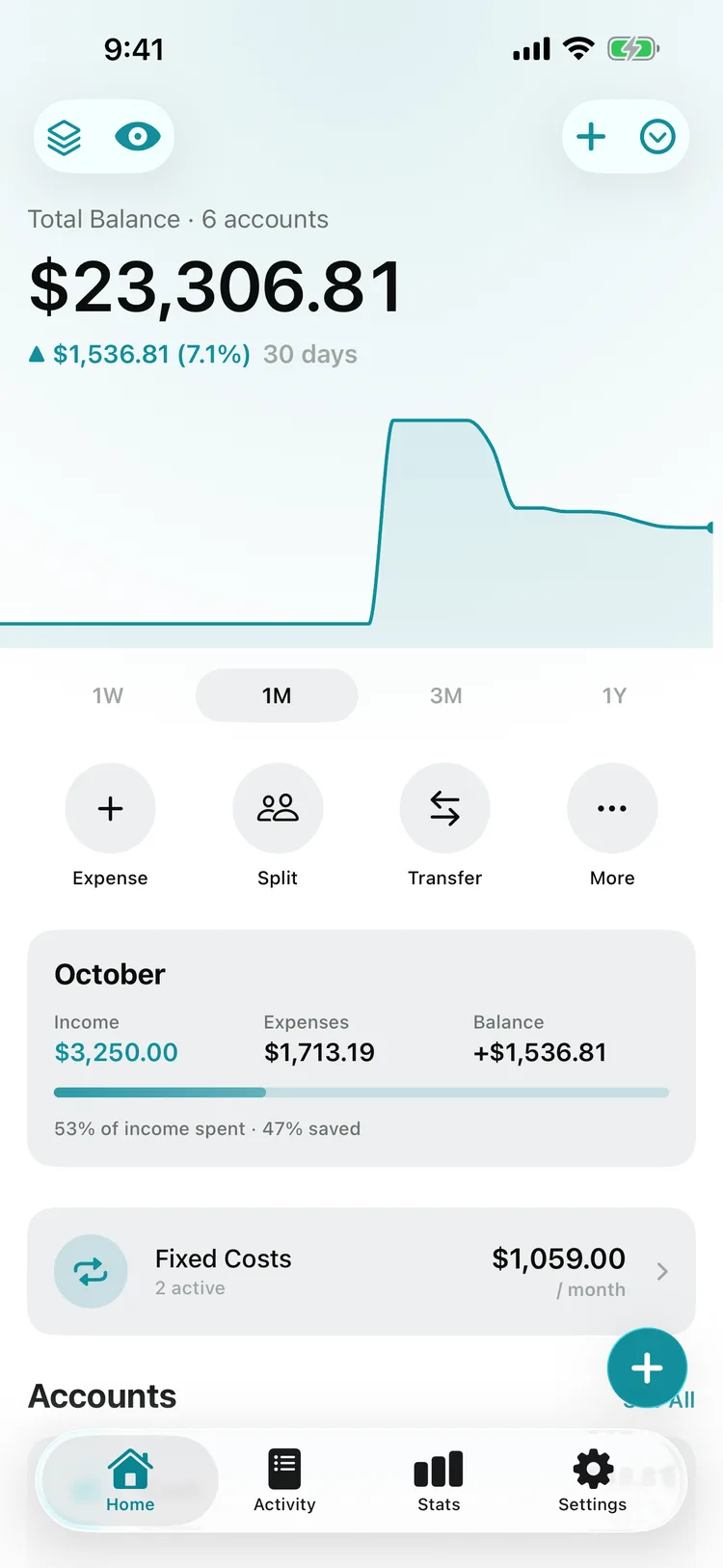
Pockpit tells you, across all your accounts and without linking your bank. Log what you spend in seconds and always see where you stand. Your data stays on your iPhone and in your own iCloud.
No bank linking
Receipt scanning
Budgets & bill reminders
No bank account linking
Stored on device & private iCloud
No ads, no data selling
Face ID app lock
Download
Get Pockpit for iPhone, iPad & iPhone Duo.
Download from the App Store and log your first expense a minute from now. No sign-up, no bank credentials, no ads — and under 15 MB.

- Try it free · Pro from $2.99/month
- iPhone, iPad & iPhone Duo · iOS 18+
- English & German
Screenshots
Inside the app: budgets, bills, statistics & more.
Everything you own, in one number
How it works
From first expense to full overview in three steps.
Capture every expense in seconds
Tap +, scan a receipt, or reuse a template. Switching apps? Import your whole history from a CSV file in one go.
Automate bills and budgets
Recurring payments post themselves, bill reminders fire before due dates, and budgets warn you before you overspend.
See where your money goes
Statistics, trends, and savings goal progress show the full picture — and PDF or CSV reports export it whenever you need.
Accounts
All balances in one place
Track cash, checking, savings, credit cards, and asset accounts with value charts — one current overview.
Expense tracking
Log spending in seconds — with receipts
Capture income, expenses, and transfers with categories, tags, notes, templates, and scanned receipts that auto-fill.
Budgets
Monthly budgets with alerts
Set category budgets, get warned before overspending, and roll remaining amounts into the next month.
Savings goals
Savings goals with visible progress
Save toward an emergency fund, a trip, or a big purchase with progress bars that keep you motivated.
Subscriptions
Recurring payments & fixed costs
Subscriptions, rent, and salary post automatically — and the fixed-costs overview shows what they add up to.
Privacy
Your data never leaves your control
Everything is stored on your device and in your personal iCloud — no external servers. Face ID and Touch ID lock it down.
Bill reminders
Never miss a due date
Payment reminders notify you before bills, contracts, and one-time payments are due — goodbye late fees.
Reports
CSV import, CSV export, PDF reports
Bring data in from other apps via CSV, export raw data, or generate polished monthly and yearly PDF reports.
Widgets
Your finances on your home screen
Glance at account balances, budget status, or upcoming payments without unlocking your phone.
Split bills
Track shared expenses with anyone
Log shared costs, split amounts, and keep track of who owes what — without leaving your financial overview.
Statistics
Understand spending visually
Charts, trends, and income statistics reveal exactly where your money goes each month.
Pricing
Simple, transparent pricing.
Free
$0
to try it out
- 10 transactions / month
- 1 budget
- 1 savings goal
- 1 recurring payment
- Payment Reminders
- Receipt scanning & auto-fill
- Split Bills
- Accounts
Pro
$2.99
/ month
or $24.99 / year
- Unlimited transactions
- Unlimited budgets
- Unlimited savings goals
- Unlimited recurring payments
- Custom categories
- Advanced statistics & charts
- PDF and CSV export
- Notifications & reminders
- Payment Reminders
- Receipt scanning & auto-fill
- Split Bills
- Accounts
FAQ
Frequently asked questions.
Do I have to link my bank account to use Pockpit?
No. Pockpit never asks for your bank login. You add transactions manually in seconds, scan receipts, or import your history via CSV — your credentials and data stay with you.
What is the easiest way to track daily expenses on iPhone?
Open Pockpit, tap +, and log an expense in a few seconds with amount, category, and account. Templates, receipt scanning, and home screen widgets make daily tracking nearly effortless.
Can I scan receipts instead of typing every purchase?
Yes. Pockpit's receipt scanner reads your paper receipt and auto-fills amount and details, so a purchase is logged in one tap — receipt photo attached.
Does Pockpit remind me before bills are due?
Yes. Set payment reminders for bills, due dates, and one-time payments, and get notified before the money leaves your account — no more late fees.
Can I track subscriptions and recurring payments?
Yes. Recurring payments post automatically with the next due date visible, and the fixed-costs overview shows what your subscriptions, rent, and contracts add up to each month.
Can I split bills and track who owes me money?
Yes. Log a shared cost, split the amount, and Pockpit keeps a running record of who owes what — inside your normal financial overview.
Does Pockpit support savings goals?
Yes. Create a savings goal with a target amount, add contributions, and watch the progress bar fill — for an emergency fund, a trip, or anything else.
Can I import my data from another budget app or my bank?
Yes. Pockpit imports CSV files exported from other finance apps or from online banking, so you can switch without losing your transaction history.
Where is my financial data stored? Is it private?
Your data is stored locally on your device and in your personal iCloud account. Pockpit uses no external servers, and Face ID / Touch ID app lock keeps it yours alone.
How much does Pockpit cost?
You can download Pockpit and try it for free, with up to 10 transactions a month, one budget, one savings goal and one recurring payment. For everyday use you need Pro, which unlocks everything for $2.99/month or $24.99/year. See pricing →
Ready to start
Know where every dollar goes — starting today.
No sign-up. No bank login. Your first expense is logged in under a minute.